Skip to content

Smart Table of Content Documention

1. Introduction (Overview)

Smart Table of Content module lets you add sections and sub-sections with selectable heading types, smooth scroll navigation, fully responsive dropdowns, and full style customization."


2. Key Features

  • Manual Section & Sub-section Management – Add and organize sections and sub-sections as needed.
  • Customizable Heading Types – Choose H1, H2, H3, or H4 for each section or sub-section easily.
  • Scroll Offset – Add top gap when scrolling to avoid sticky header overlap (desktop only).
  • Responsive Dropdown Navigation – Automatically converts TOC into a mobile-friendly dropdown.
  • Full Customization – Adjust styles, colors, spacing, and typography to match your design.

3. Installation – Downloading the Module from HubSpot Marketplace

  • Log in to your HubSpot account.
  • Go to the Marketplace from the main navigation menu.
  • Search for your module by name.
  • Find the module in the results and click Install.
  • If it’s a paid module, you can also click Buy Now to purchase and install directly.

4. How to Use – Adding the Module to Your Page

  • Open your HubSpot page editor.
  • Click on Add Module.
  • Search for your module by name.
  • Drag and drop the module into the desired section of your page.
  • Smart Table of Content module lets you add sections and sub-sections with selectable heading types. Click any item to smoothly scroll to its content. Fully responsive with navigation dropdowns and full style customization.


5. Module Settings Guide

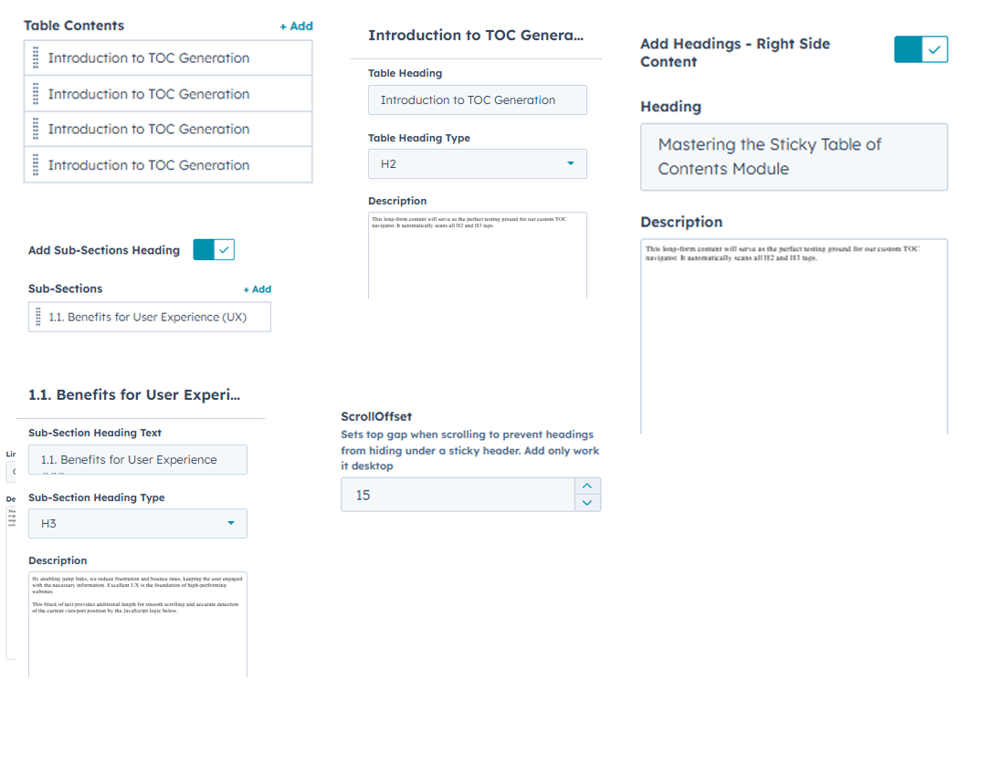
1. Content Tab 

  • Manual Section & Sub-section Management – Add and organize sections and sub-sections as needed.
  • Customizable Heading Types – Choose H1, H2, H3, or H4 for each section or sub-section easily.
  • Scroll Offset – Add top gap when scrolling to avoid sticky header overlap (desktop only).
  • Add Headings - Right Side Content - Show or hide top heading and description easily.

Group 1000002085


2. Style Tab


  • Module Width Type: Choose full width or custom container for the Smart Table of Content module.
  • Table Bar Customization: Style background, borders, section & sub-section fonts, colors, and active states.
  • Responsive Dropdown Navigation: Customize dropdown background and arrow icon colors for mobile.
  • Table Content Customization: Fully style fonts, descriptions, headings, and their colors.
  • Responsive Design: Works perfectly across all devices (mobile, tablet, desktop)..
Group 1000002081 (1)

6. Examples / Demo Preview

View the module in action: https://www.modfrybus.shop/smart-table-of-content

7. Support & Contact

For questions or support, contact us at productqueriemodfrybus@outlook.com We’re happy to help!