Interactive Pricing Master module lets you build flexible pricing plans with base price and feature selection using checkboxes or check, cross icons, with live total updates. Supports tabs for Base, Pro, Enterprise plans, multiple accordions, and is fully customizable and responsive.
5. Module Settings Guide
1. Content Tab- Tabbed Pricing: Base, Pro & Enterprise plans in separate tabs.
- Reset Button: Quickly reset selections for a clean start.
- Feature Info Text Header: Display helpful info for feature.
- Headers for Each Plan: Clear headers for Base, Pro, and Enterprise.
- Multiple Accordions: Add one or more accordion sections to organize options.
- Estimate Total: Shows real-time total cost as selections are made.
- Checkbox & Cross Icon Options: Select features via checkboxes or cross icons.
- Base Price Support: Set a starting price for each plan.
- Live Total Updates: Totals recalc instantly on every selection.
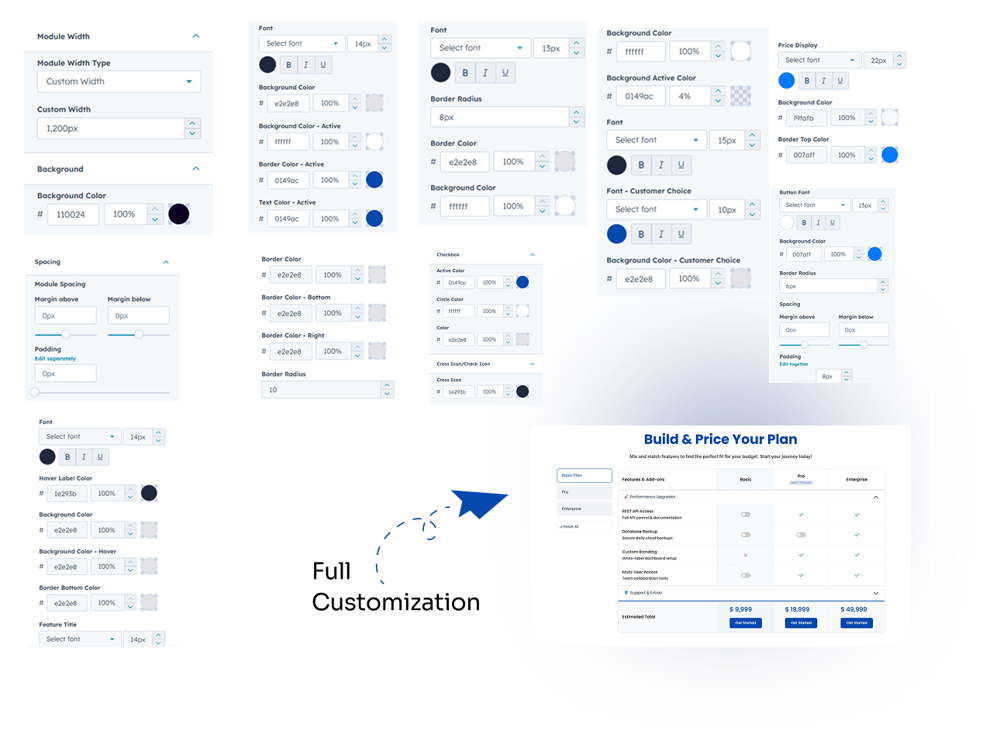
.png?width=1000&height=885&name=Group%20469439%20(1).png)
2. Style Tab
- Module Width: Choose between Custom Width or Full Width for the module.
- Module Spacing: Adjust spacing (margin & padding) around the module.
- Tabs: Fully customizable – font, background color, active color, border color (active), border radius.
- Reset Button: Customize font, border color, background color.
- Pricing Plan Header: Background color, active font, custom font, border-bottom color, box shadow.
- Pricing Plan Inner Section: Border color, border-bottom color, border-right color, border radius.
- Accordion: Font, hover label color, background color, hover background color, border-bottom color, title font, description font.
- Checkbox: Active color, circle color, border/color.
- Cross / Check Icon: Customizable color.
- Arrow: Customizable color.
- Estimate Total: Font, background color, top color, border color.
- Buttons: Customizable – font, background color, border radius, text color, hover color.