Skip to content

Dynamic Pricing Calculator Documention

1. Introduction (Overview)

This Dynamic Pricing Calculator module transforms static HubSpot pricing tables into a live, interactive calculator. It instantly shows SaaS and B2B customers their exact total cost based on user count, effectively building trust and accelerating their buying decision through complete pricing transparency.


2. Key Features

  • Interactive User Slider: Customers can easily drag the slider to set the exact number of users they need for their team size.
  • Real-Time Price Updates:As soon as the customer moves the slider, the final price for all pricing plans changes instantly.
  • Dual Input Method (Slider & Type): Customers have two options: they can set the user count using the smooth slider OR type the exact number directly into the input box.
  • Clarity with Tooltip:A small box (tooltip) above the slider handle always displays the precise user number, ensuring there is zero confusion about the calculation.
  • Multi-Plan Builder:Add, edit, or remove any number of pricing cards (tiers). Define the unique base price and per-user fee for each plan.
  • Full Customization: Enjoy complete control with full customization options for your design.
  • Fully Responsive Design: The module is optimized for all devices, ensuring a seamless experience on desktops, tablets, and smartphones.

3. Installation – Downloading the Module from HubSpot Marketplace

  • Log in to your HubSpot account.
  • Go to the Marketplace from the main navigation menu.
  • Search for your module by name.
  • Find the module in the results and click Install.
  • If it’s a paid module, you can also click Buy Now to purchase and install directly.

4. How to Use – Adding the Module to Your Page

  • Open your HubSpot page editor.
  • Click on Add Module.
  • Search for your module by name.
  • Drag and drop the module into the desired section of your page.
  • This Dynamic Pricing Calculator module replaces static tables with a live, interactive calculator on your HubSpot site. It instantly shows SaaS and B2B customers their exact total cost based on user count, accelerating the sales process through complete transparency. The module is fully customizable in the editor and 100% responsive, ensuring a perfect price presentation on any device.


5. Module Settings Guide

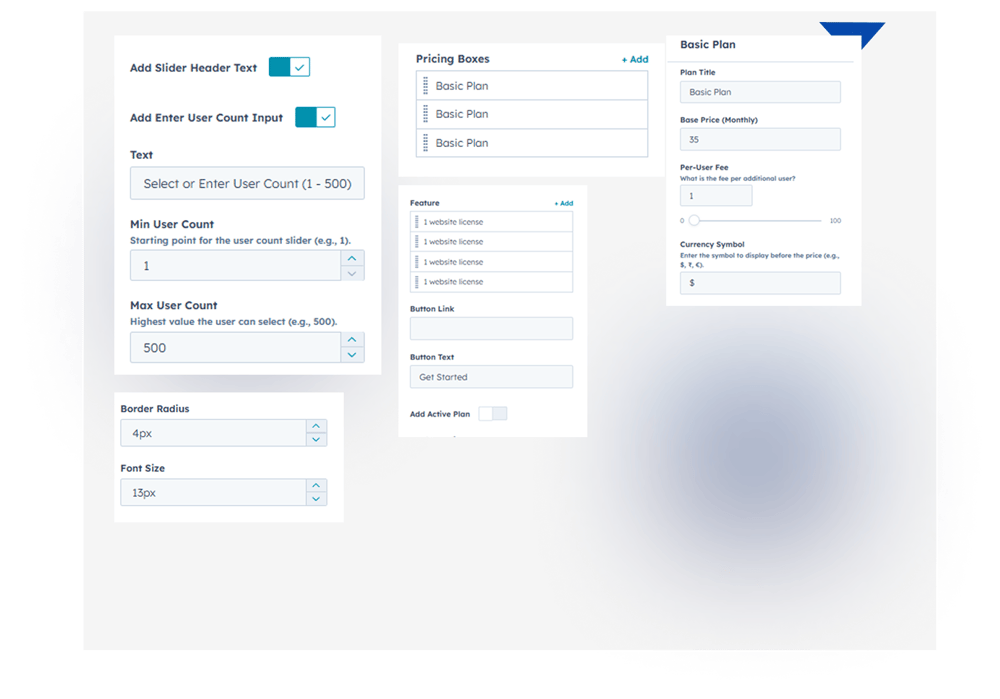
1. Content Tab 

  • Interactive User Slider: Customers can easily drag the slider to set the exact number of users they need for their team size.
  • Real-Time Price Updates:As soon as the customer moves the slider, the final price for all pricing plans changes instantly.
  • Dual Input Method (Slider & Type): Customers have two options: they can set the user count using the smooth slider OR type the exact number directly into the input box.
  • Clarity with Tooltip:A small box (tooltip) above the slider handle always displays the precise user number, ensuring there is zero confusion about the calculation.
  • Min/Max User Control: Set min/max user limits for the slider to enforce your exact pricing and business rules.
  • Multi-Plan Builder:Add, edit, or remove any number of pricing cards (tiers). Define the unique base price and per-user fee for each plan.
  • Full Customization: Enjoy complete control with full customization options for your design.

Group 1000002096

2. Style Tab

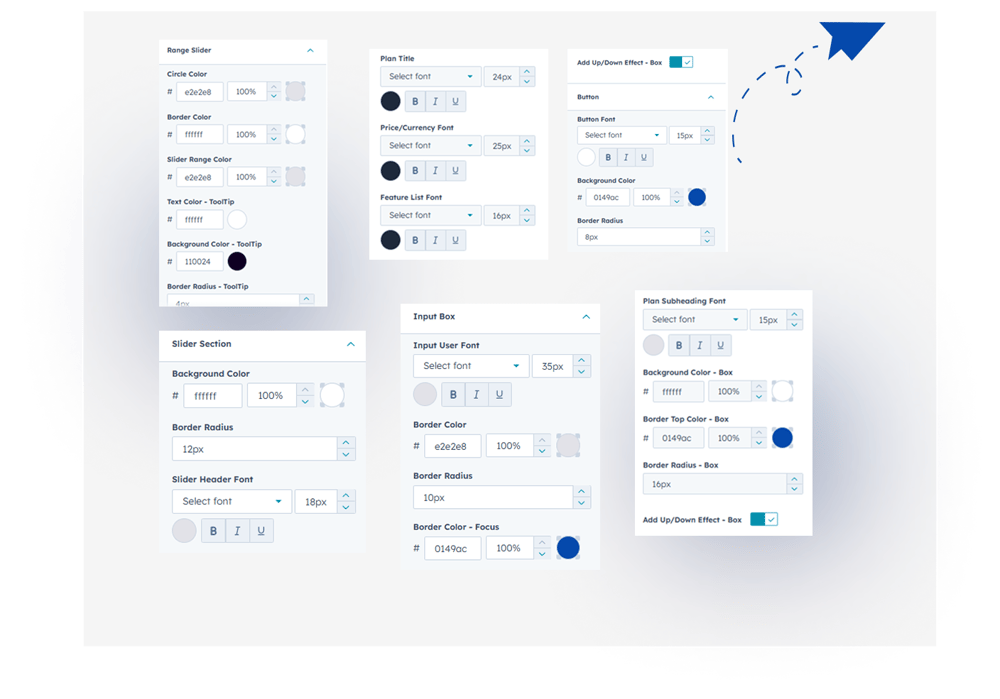
  • Module Width Type: Choose full width or custom container for the Dynamic Pricing Calculator module.
  • Slider Section: Full control over container background, padding, and border radius.
  • Input Box: Customize the input number's font, border radius, and focus color.
  • Range Slider: Control the handle color, track fill, and the tooltip color/style.
  • Responsive Design: Works perfectly across all devices (mobile, tablet, desktop)..
Group 1000002097

6. Examples / Demo Preview

View the module in action: https://www.modfrybus.shop/dynamic-pricing-calculator

7. Support & Contact

For questions or support, contact us at productqueriemodfrybus@outlook.com We’re happy to help!