The Dynamic Blog Slider module lets you display your blog posts in modern, customizable slider layouts. Choose recent or popular posts, select your blog source, and showcase content in image-first, overlay, or split layouts. Fully responsive and easy to style.
Dynamic Blog Slider Documention
1. Introduction (Overview)
2. Key Features
- Post Type Selection — Display Recent or Popular posts based on your chosen criteria.
- Choose Blog Source — Select exactly which blog you want the posts to come from.
- Multiple Slider Layouts — Pick from various designs like content-overlay, image-first, or split layout.
- Fully Responsive Slider — Smooth performance across desktop, tablet, and mobile.
- Fully Customizable: Adjust card colors, typography, shadows, and spacing.
- Autoplay Options — Control autoplay speed, pause on hover, and looping.
- Navigation Controls — Show/hide arrows and dots as needed.
- Slides to Show — Adjust the number of slides per device.
3. Installation – Downloading the Module from HubSpot Marketplace
- Log in to your HubSpot account.
- Go to the Marketplace from the main navigation menu.
- Search for your module by name.
- Find the module in the results and click Install.
- If it’s a paid module, you can also click Buy Now to purchase and install directly.
4. How to Use – Adding the Module to Your Page
- Open your HubSpot page editor.
- Click on Add Module.
- Search for your module by name.
- Drag and drop the module into the desired section of your page.
-
The Dynamic Blog Slider module helps you showcase blog posts in multiple stylish slider layouts. Choose your post type, pick which blog to display, and customize the look with image-first, overlay, or split designs. Fully responsive and easy to set up.
5. Module Settings Guide
1. Content Tab- Post Type Selection — Display Recent or Popular posts based on your chosen criteria.
- Choose Blog Source — Select exactly which blog you want the posts to come from.
- Enable/Disable Post Elements – Toggle description, date, and author on or off.
- Multiple Slider Layouts — Pick from various designs like content-overlay, image-first, or split layout.
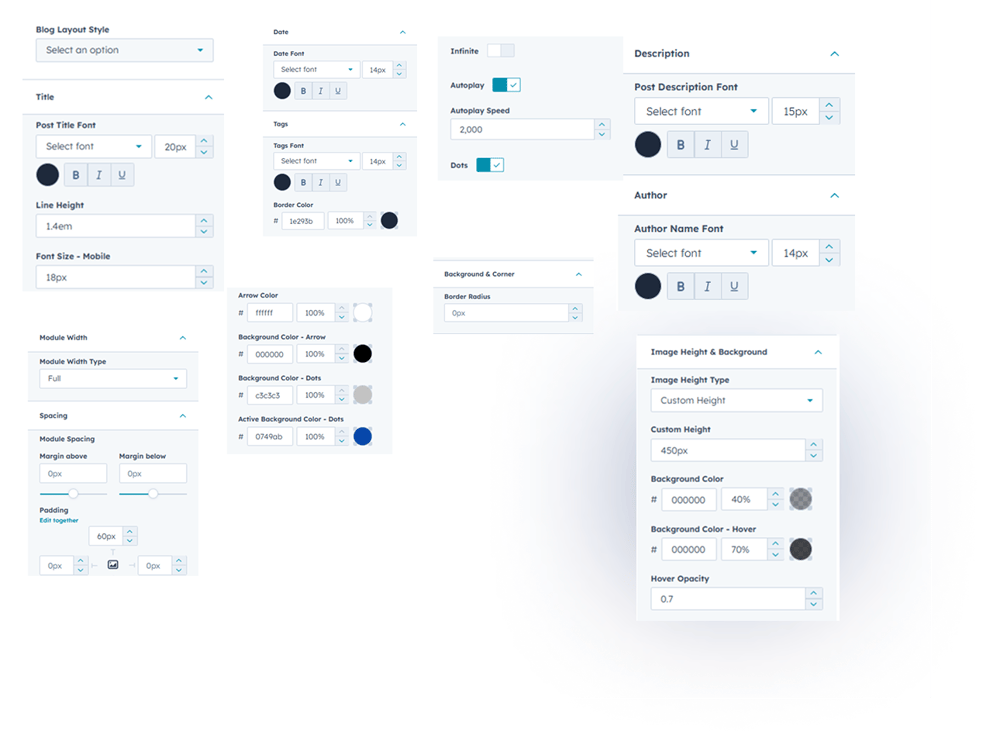
2. Style Tab
- Module Width – Choose between full-width or custom container layout.
- Module Spacing – Easily manage spacing for clean section design.
- Blog Slider Layouts – Pick from multiple modern slider designs.
- Post Content Styling – Customize title, description, author, date & tags.
- Image Height & Background – Adjust image size and set overlays or colors.
- Background & Corners – Apply border radius and background styling.
- Read Time Styling – Edit font size, color, and family for read-time text.
- Slider Controls – Set autoplay, arrows, dots, infinite scroll & slides-to-show.
- Responsive Design: Works seamlessly on desktop, tablet, and mobile.
6. Examples / Demo Preview
View the module in action: https://www.modfrybus.shop/dynamic-blog-slider
7. Support & Contact
For questions or support, contact us at productqueriemodfrybus@outlook.com We’re happy to help!